Every symbol humans create carries a purpose. Even the humble paragraph mark — that little backwards “P” — has been shaping how we read and write for over a thousand years. Symbols like these are the invisible architects of language.
They guide our eyes, organize our thoughts, and help writers speak clearly on the page. Understanding paragraph symbols is not just useful for editors — it connects you to a long history of human communication.
Paragraph symbols represent order and clarity. At their heart, they tell the reader: a new thought begins here. Before modern punctuation existed, these marks were the only way scribes could break up a wall of text.
They were tools of respect for the reader — a way of saying, “I care that you understand me.” That is a deeply human impulse, and it has not changed.
On a broader level, paragraph and formatting symbols stand for structure in a chaotic world. Every time a writer uses these marks, they are participating in a tradition that goes back to ancient Greek scholars and medieval monks. These symbols are small but powerful — they are the backbone of written language itself.
25+ Paragraph Symbols and Their Meanings
The Main Paragraph Symbol ¶
The pilcrow is the king of paragraph symbols. It is the one most people are searching for when they type “paragraph symbol.” Everything below grew from this single mark.
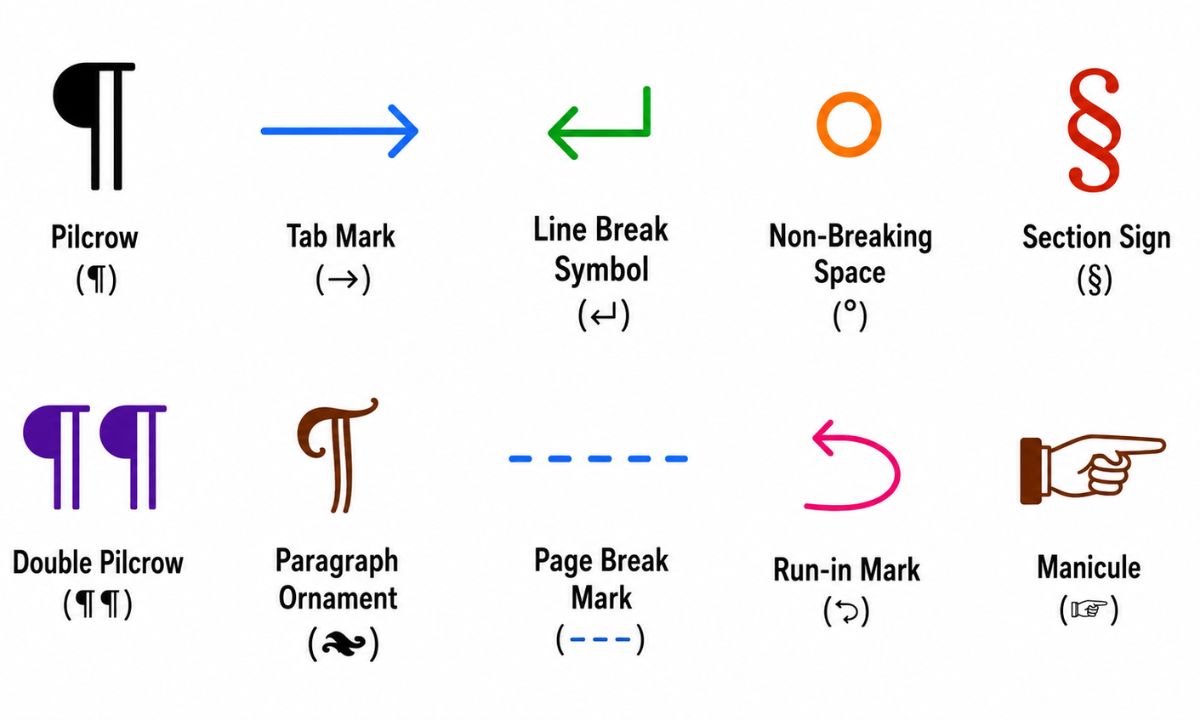
Pilcrow — ¶
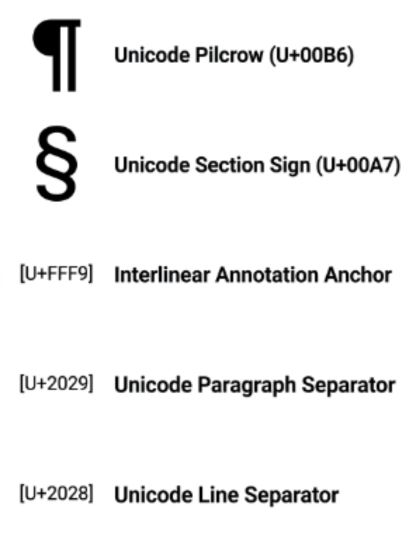
The pilcrow (¶) is the official paragraph symbol. Its name comes from the Greek word paragraphos, meaning “written beside.” Medieval scribes drew it in red ink to show where a new idea started. Today it is used in editing, legal documents, and word processors like Microsoft Word. It signals: new paragraph here.
Formatting Marks in Word Processors ⌨️
These are the hidden symbols you see when you click “Show/Hide” in Microsoft Word or Google Docs. They do not print — they only help you edit.
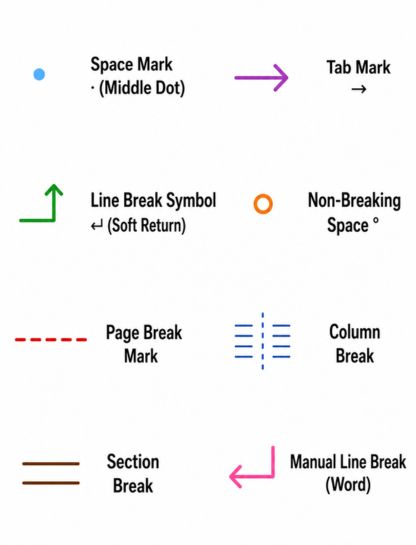
Space Mark · (Middle Dot)
The small dot (·) between words shows a single space. It helps editors spot double spaces or missing spaces in a document. Writers use it during proofreading to make sure spacing is clean and consistent.
Tab Mark →
The right-pointing arrow (→) shows where a Tab key press happened. It appears in word processors when hidden characters are turned on. Editors use it to find unwanted tab spaces that can mess up document formatting.
Line Break Symbol ↵ (Soft Return)
The bent arrow (↵) shows a line break — also called a soft return. It moves text to a new line without starting a whole new paragraph. Writers use it in poems, addresses, or tight layouts where a full paragraph break would be too much space.
Non-Breaking Space °
In some word processors, a small raised circle (°) shows a non-breaking space. This is a special space that keeps two words glued together on the same line — useful for names, dates, and numbers that should not be split across two lines.
Page Break Mark
A page break marker is a dotted line across the screen that says “Page Break.” It means the next word will start on a brand-new page. Writers insert these to control where chapters or sections begin.
Column Break
A column break mark tells the text to jump to the next column on the page. It is used in newsletters, magazines, and academic papers with multi-column layouts.
Section Break
A section break divides a document into independent parts. Each section can have its own page numbers, headers, or margins. It is one of the most powerful — and most misunderstood — formatting marks in word processing.
Manual Line Break (Word)
Different from a soft return, this mark looks like a bent arrow with a short tail. Microsoft Word uses it to show a forced line break that was typed with Shift + Enter. It is important during editing to distinguish it from regular paragraph breaks.
Typographic and Editorial Symbols 📝
These symbols show up in typography, book editing, legal writing, and publishing. They have long professional histories.
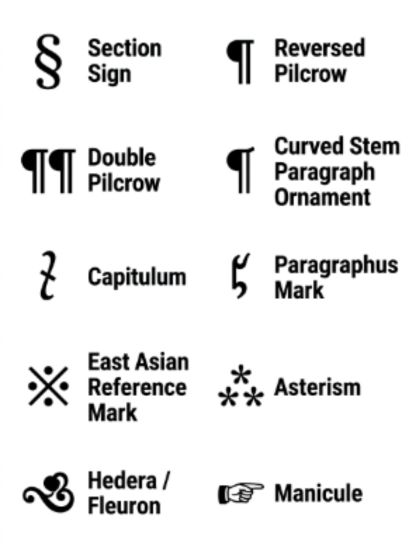
Section Sign — §
The section sign (§) looks like two overlapping “S” shapes. It is used in legal and academic writing to refer to a section of a document or law. You might see it in a contract: “See §4 for terms.” It is not the same as the paragraph mark, but it is closely related.
Reversed Pilcrow — ⁋
The reversed pilcrow (⁋) is the mirror image of the regular paragraph mark. It is used for the same purpose as the pilcrow but appears more often in handwritten editing and in right-to-left text workflows. It is rare in digital documents today.
Double Pilcrow — ¶¶
Two pilcrows placed side by side (¶¶) are used in legal writing to reference multiple paragraphs at once. If a contract says “See ¶¶ 3–5,” it means: look at paragraphs 3 through 5. It is a practical shorthand for legal professionals.
Curved Stem Paragraph Ornament — ❡
This decorative version of the pilcrow (❡) is used for stylistic purposes in typesetting and book design. It is more ornate than the standard pilcrow. Book designers sometimes use it as a drop cap or decorative chapter opener.
Capitulum — ⸿
The capitulum (⸿) is an ancient paragraph marker that predates the pilcrow. The word means “little head” in Latin. Medieval scribes used it to mark the start of a new section. It looks like a small capital C with a line. Today it is mostly a historical curiosity.
Paragraphus Mark — ⹍
The paragraphus mark (⹍) is one of the oldest paragraph symbols. It looks like a horizontal line, sometimes with a small mark on top. Ancient Greek and Roman scribes used it to show topic changes in manuscripts. It is the direct ancestor of the modern pilcrow.
East Asian Reference Mark — ※
The reference mark (※) is used in Japanese, Chinese, and Korean typography. It marks a note, reference, or annotation. It works similarly to an asterisk (*) but is shaped like a snowflake or asterisk inside a circle. And it carries a sense of importance in East Asian documents.
Asterism — ⁂
The asterism (⁂) is three asterisks arranged in a triangle. Historically it was used in books to separate major sections or act as a “scene break.” Today it is mostly used in fiction to mark a time jump or a shift in perspective. It is elegant and dramatic.
Hedera / Fleuron — ❧
The hedera (❧) looks like a small ivy leaf. It was one of the very first paragraph separators used by ancient Greek and Roman scribes. Printers later used it as a decorative paragraph marker in books. Today designers use it as an ornamental break between sections.
Manicule — ☞
The manicule (☞) is a small pointing hand symbol. Medieval scribes drew it in the margins to say: “Pay attention here — this is important.” Readers also doodled them in their own books to mark favorite passages. Today it appears as an emoji and in retro design styles.
Unicode and Technical Paragraph Symbols 💻
These symbols have specific Unicode codes. Developers, web designers, and technical writers use them often.
Unicode Pilcrow — U+00B6
The standard pilcrow has the Unicode code U+00B6. You can type it in HTML as ¶. It works in every modern browser and document system. This is the “official” digital version of the paragraph symbol used globally.
Unicode Section Sign — U+00A7
The section sign (§) has the Unicode code U+00A7. In HTML it is written as §. It appears in law books, academic papers, and technical manuals worldwide. Every major operating system supports it natively.
Interlinear Annotation Anchor — U+FFF9
This invisible Unicode character marks the start of an annotation or ruby text. It is used in East Asian typography to add pronunciation notes above characters. It does not print or display visibly — it works behind the scenes in text encoding.
Paragraph Separator — U+2029
The paragraph separator (U+2029) is a Unicode control character. It marks the boundary between paragraphs in plain text files. It is not a visible symbol — it lives in the code. Programmers use it to handle paragraph breaks in text processing systems.
Line Separator — U+2028
The line separator (U+2028) is similar but marks a single line break, not a full paragraph break. It is also invisible. Developers use it to separate lines in code without creating a new paragraph in text documents.
Proofreading and Editing Marks ✏️
These paragraph-related symbols are used by editors and proofreaders when correcting manuscripts.
New Paragraph Mark (Proofreading)
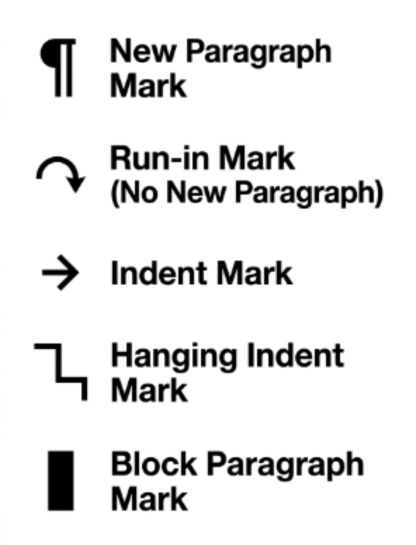
When a proofreader wants to create a new paragraph in a manuscript, they write ¶ in the margin and draw a line to where the break should go. It is one of the most common proofreading marks. Every editor learns it early.
Run-in Mark (No New Paragraph)
The run-in mark looks like a curved arrow connecting two lines — it means “remove this paragraph break and combine these into one.” Editors use it when a paragraph has been split incorrectly. It is the opposite instruction of the pilcrow.
Indent Mark
A small arrow pointing right, or the letter “ind,” tells a typesetter to indent the first line of a paragraph. It is used in traditional proofreading when a paragraph indent is missing. It is a simple but important mark for clean layout.
Hanging Indent Mark
A hanging indent mark shows that the second and following lines of a paragraph should be indented — but not the first line. It is common in bibliographies, reference lists, and legal documents. Editors use a small bracket to show the desired indent position.
Block Paragraph Mark
This proofreading symbol tells a typesetter to remove all first-line indents and add space between paragraphs instead — a “block style.” It is common in business letters and modern web writing where indents are less common.
Decorative and Historical Paragraph Symbols 🎨
These symbols have artistic or ceremonial uses beyond pure function.
Red Pilcrow (Rubric Mark) 🔴
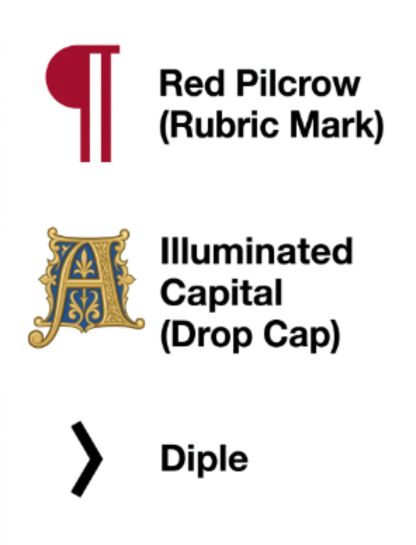
In medieval manuscripts, the pilcrow was painted in red by a specialist called a “rubricator.” Red marks held special importance — they were sacred or urgent. The red pilcrow was a visual cue that something spiritually or legally important was beginning.
Illuminated Capital (Drop Cap) 🖋️
In ancient manuscripts, the first letter of a new section was often painted as a large decorated letter called an illuminated capital or drop cap. It served the same purpose as a paragraph mark but in a grander, more artistic way. It declared: something important starts here.
Diple — ›
The diple (›) is an ancient Greek symbol that looks like a small angle bracket pointing right. Scribes placed it in the margins to mark quoted text or important passages. It is a distant ancestor of both quotation marks and paragraph marks.
Ancient Cultures That Used These Symbols
The paragraph symbol is one of the oldest tools of writing. Many cultures played a role in shaping it.
Ancient Greeks — Used the paragraphos, a simple horizontal line, to show topic changes in manuscripts. This was the direct ancestor of the modern pilcrow.
Roman scribes — Adopted the Greek system and added the letter “K” (for kaput, meaning “head”) to mark new sections in important texts.
Medieval Catholic Church — Monks and rubricators painted pilcrows in red ink in religious manuscripts. The symbol was considered sacred because it organized the Word of God.
Medieval European scribes — Developed the “C” shape (for capitulum, meaning “little head”) that eventually transformed into the modern ¶ over centuries of handwriting.
Early printers (15th century) — When the printing press arrived, printers left blank spaces for rubricators to add pilcrows by hand. Eventually they stopped doing this — and the paragraph indent was born as a replacement.
East Asian cultures — Developed their own reference marks like ※ for annotations and sacred texts in Chinese, Japanese, and Korean manuscripts.
Legal and academic traditions — The section sign (§) grew from Roman legal writing and became a standard symbol for referencing laws, codes, and contracts across Western civilization.
Why Paragraph Symbols Still Matter Today
These tiny marks are more important than ever. In the age of digital content, clean formatting is everything. A well-placed paragraph break or section marker can make an article easier to read, a legal contract clearer, and a book more enjoyable.
Writers, editors, web developers, and designers use these symbols every single day — often without thinking about the thousand-year history behind them.
On a personal level, understanding formatting symbols gives you real power over your writing. Whether you are cleaning up a Word document, coding a website, or proofreading a novel, these marks help you say exactly what you mean.
And in a deeper sense, every time you use a pilcrow or a section sign, you are part of a line of communicators stretching back to ancient Greek scholars who first cared enough to make reading easier for others.
Frequently Asked Questions
What is the paragraph symbol called?
It is called the pilcrow, also known as the paragraph mark, paragraph sign, paraph, or blind P.
How do I type the paragraph symbol on a keyboard?
On Windows, hold Alt and type 0182 on the numpad. On Mac, press Option + 7. In HTML, use ¶.
What is the difference between a paragraph mark and a line break?
A paragraph mark (¶) starts a new paragraph with spacing above and below. A line break (↵) just moves to the next line within the same paragraph.
What is the section sign § used for?
The section sign (§) is used in legal and academic writing to reference a specific section, clause, or part of a document or law.
How do I hide paragraph marks in Microsoft Word?
Click the ¶ button in the Home tab toolbar, or press Ctrl + Shift + 8 (Windows) or Command + 8 (Mac) to toggle formatting marks on and off.
Conclusion
Paragraph symbols are small marks with a giant history. From ancient Greek manuscripts to modern word processors, these signs have shaped the way humans write and read.
Whether you are looking for the pilcrow, trying to clean up a document in Word, or just curious about that little backwards P, these symbols connect you to thousands of years of human effort to make language clear. Next time you see ¶, you will know — it is one of the oldest tools a writer has.